Audio Recorder with Noise Cancellation
Record on Android, then let AI cancel background noise and clean up your audio
Need an audio recorder with noise cancellation? Our Android app lets you record voice, interviews, and podcasts on your phone — then AI removes background noise, echo, and uneven volume in one tap.


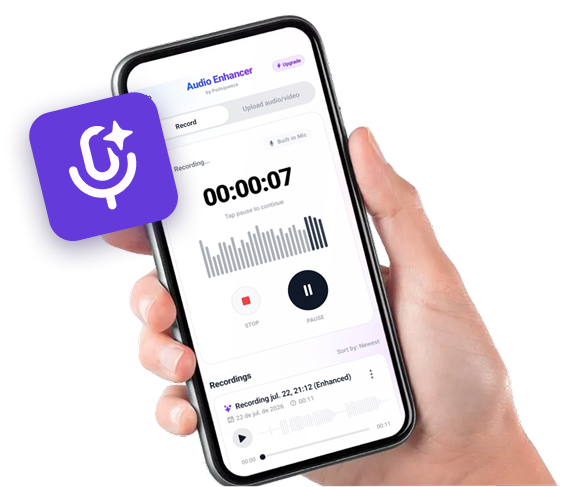
Available as app for android
Record on your phone.
Sound like you're in a studio.


Hear the Difference
Compare the original audio with the AI-enhanced version
Podcast with Background Noise
Original audio with background noise
Recording with Echo
Original audio with background noise
Audio with Irregular Volume
Original audio with background noise
Ready to enhance your audio?
Recorder + Noise Cancellation Features
Record and clean audio in one Android app

Built-In Recorder
Capture voice and audio directly on Android
AI Noise Cancellation
Remove background noise after recording
Echo Reduction
Clean up room echo and reverb
Volume Balancing
Normalize loudness across your recording
File Upload
Enhance existing recordings from your phone
Before/After Preview
Compare original and enhanced audio
Who Needs a Recorder with Noise Cancellation?
Recording podcasts on your phone?
Capture episodes anywhere and cancel background noise afterward. Sound professional without a studio setup.
- ✓AI noise removal
- ✓Built-in Android recorder
- ✓Echo and reverb reduction
- ✓Download or use on web
Recording interviews in the field?
Noisy cafes and streets won't ruin your audio. Record first, then AI removes the interference.
- ✓AI noise removal
- ✓Built-in Android recorder
- ✓Echo and reverb reduction
- ✓Download or use on web
Taking voice memos at work?
Record meetings and ideas clearly. Noise cancellation makes every memo easy to understand.
- ✓AI noise removal
- ✓Built-in Android recorder
- ✓Echo and reverb reduction
- ✓Download or use on web
Creating content for social media?
Record voiceovers on Android and clean them up before posting to YouTube, TikTok, or podcasts.
- ✓AI noise removal
- ✓Built-in Android recorder
- ✓Echo and reverb reduction
- ✓Download or use on web
RECORD & CLEAN AUDIO
Record clear audio on Android with built-in noise cancellation
Record first, enhance with AI
Use the built-in recorder to capture voice on your Android phone. When you're done, AI noise cancellation removes background sounds automatically.
Cancel noise after recording
Even recordings made in noisy rooms can be cleaned up. Remove chatter, hum, wind, and ambient room tone without manual editing.
Professional results, no editing skills
Skip complicated audio software. Record on your phone, tap enhance, and download broadcast-ready audio in minutes.
SIMPLE ANDROID WORKFLOW
How to record with noise cancellation on Android
1. Download the app
Install Audio Enhancer and Recorder from Google Play on your Android phone.
2. Record your audio
Tap record to capture voice, an interview, or a podcast clip. You can also upload an existing file.
3. Apply noise cancellation
AI analyzes your recording and removes background noise, echo, and uneven volume. Download the clean version when ready.

FREQUENTLY ASKED QUESTIONS
FAQ
Can I use this without the Android app?
Yes. Click Continue on Web to upload and enhance recordings in your browser without installing anything.
What types of noise can be removed?
Background chatter, room tone, hum, hiss, wind, and ambient environmental noise can all be reduced with AI processing.
Do I need headphones to record?
No, but using a closer mic or headset can improve source quality. AI enhancement works on any recording.
Contact
For questions, feedback, or feature requests email support@podsqueeze.com.